Lootbound auras: why a nearby item gets no bonus
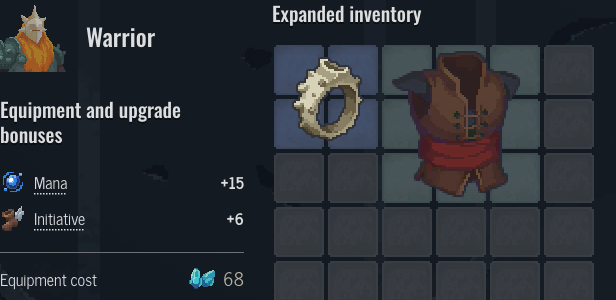
An aura needs both a matching item and a matching position. Thorn Stone Ring strengthens weapons in its surrounding cells; putting armor beside the ring does not activate that bonus. Check the target category before rearranging your bag.
Try the example
Equipment bonuses
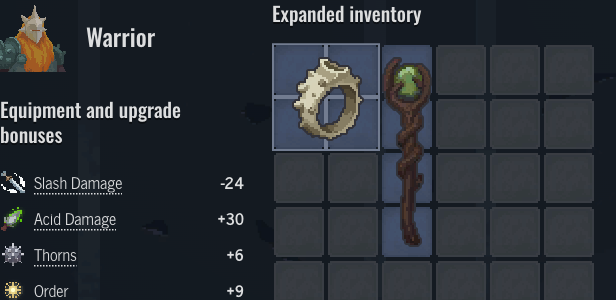
 Slash Damage
- -24
 Acid Damage
- +30
 Thorns
- +6
 Order
Order- +9
Does the aura affect this item type?
Start with the aura's target, not the color of the equipment. Thorn Stone Ring targets weapons. Acid Staff is a weapon, while Accompanist’s Leather Vest is armor. The vest can sit beside the ring without receiving its aura. A neighboring item being legal to equip does not make it a legal aura recipient.
Use the item links here to inspect the same equipment while reading. Keep the ring in place and switch the example between a weapon and armor. The ring contributes 6 Thorns and 9 Order to each matching recipient. The vest's own bonuses still exist when the aura does not apply; losing an aura is not the same as removing an item's base stats.
Which cells actually count as nearby?
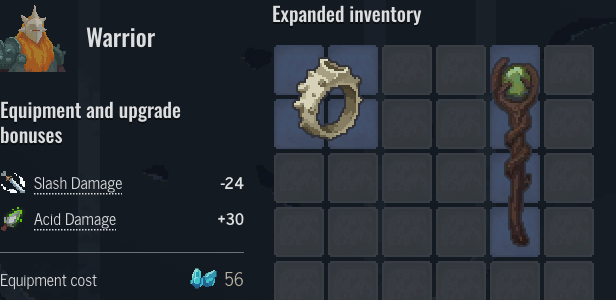
For this surrounding aura, cells immediately above, below, left and right of the ring count. Diagonal contact alone does not. Move Acid Staff away from the ring in the example: its base damage modifiers remain, but the ring's contribution disappears. The item silhouette matters, so judge occupied cells rather than an imagined filled rectangle around an irregular shape.
One recipient gets one copy of this aura even when several of its cells touch the affected area. This makes a long weapon useful for reaching an aura, but touching two cells does not mean two copies of the same bonus. Other items can use beams, selected cells or edge conditions instead. Inspect their own aura description rather than applying this ring's surrounding pattern to every item.
How do I test a layout without losing my build?
The worked example changes only this guide's example selection. Open it in the equipment planner to try other equipment, move a placed item or rotate a shape that allows rotation. That link carries the selected layout, so you do not need to rebuild the demonstration by hand. Opening the example does not overwrite your existing per-hero draft; editing it in the planner saves the edited plan.
When an aura appears to do nothing, check three things in order: the allowed recipient, the occupied cells inside its range and any activation condition on the item. Compare the contribution before and after moving one item. Use the planner's share link to preserve the layout you actually want, rather than treating a screenshot as a recoverable build.